

Health & Stats
These endpoints require no authentication and are safe to expose to monitoring tools.
GET /
FlareSolverr-style readiness message - confirms the API process is up (does not wait on the browser pool).
Response
{
  "msg": "TRAWL is ready!",
  "version": "1.9.3",
  "uptime": 42
}
Curl
curl -s http://localhost:8191/GET /health
Full system health check. Used by Docker Compose health checks and monitoring systems.
Response
{
  "status": "ok",
  "uptime": 3842,
  "pool": {
    "total": 1,
    "busy": 1,
    "available": 0,
    "restarts": 0,
    "avgRestarts": 0,
    "stalled": 0,
    "live": 1
  },
  "memory": {
    "currentBytes": 734003200,
    "limitBytes": 1073741824,
    "recommendedLimitBytes": 1073741824,
    "underProvisioned": false,
    "oomEvents": 0,
    "oomKills": 0
  }
}| Field | Type | Description |
|---|---|---|
status | string | "ok" when the pool has live capacity; otherwise "starting" |
uptime | number | Seconds since the API process started |
pool.total | number | Total browser instances in the pool |
pool.busy | number | Browsers currently processing a request |
pool.available | number | Browsers ready to accept a request |
pool.restarts | number | Total browser restarts since worker boot |
pool.avgRestarts | number | Average restarts per browser |
pool.stalled | number | Checked-out browsers past their deadline |
pool.live | number | Connected, non-stalled browser capacity |
memory.currentBytes | number | Current cgroup memory usage |
memory.limitBytes | number | Cgroup memory limit |
memory.recommendedLimitBytes | number | Recommended minimum for the configured browser pools |
memory.underProvisioned | boolean | Whether the detected limit is below the recommendation |
memory.oomEvents | number | OOM events reported by the cgroup |
memory.oomKills | number | OOM kills reported by the cgroup |
/health returns HTTP 503 while the pool is warming up or has no live browser capacity. A saturated but healthy pool remains ready because active, connected requests still count as live. The optional memory object is included when Linux cgroup memory data is available; its presence does not affect readiness.
Curl
curl -s http://localhost:8191/health | jqGET /stats
Lightweight public stats for dashboards and landing pages.
Response
{
  "browsers": 5,
  "available": 4,
  "busy": 1,
  "restarts": 0,
  "stalled": 0,
  "live": 5,
  "queueDepth": 0,
  "longestBusyMs": 12000,
  "draining": false,
  "headful": null
}| Field | Type | Description |
|---|---|---|
browsers | number | Total browser pool size |
available | number | Idle browsers |
busy | number | Browsers in use |
restarts | number | Total browser restarts since startup |
stalled | number | Checked-out browsers past their deadline |
live | number | Connected, non-stalled browser capacity |
queueDepth | number | Requests currently waiting for a browser |
longestBusyMs | number | Milliseconds since the oldest active checkout began; zero when idle |
draining | boolean | true once shutdown has begun and new browser checkouts are refused |
Curl
curl -s http://localhost:8191/stats | jqPrometheus / uptime monitoring
Point an uptime monitor (e.g. UptimeRobot, Uptime Kuma) at /health. A 200 response with "status": "ok" confirms full operation.
For Prometheus, scrape GET /metrics.
GET /metrics
The main browser pool's numbers in the Prometheus text exposition format (text/plain; version=0.0.4), for a Prometheus scrape job, a Kubernetes ServiceMonitor or a Horizontal Pod Autoscaler fed by a metrics adapter. It reads the same pool state as /stats, needs no authentication, and is independent of the local metrics dashboard: the dashboard records completed requests in SQLite for people to browse, while /metrics exposes live pool saturation for scrapers. Values are zero until the main pool is constructed, then reflect its current state during startup and operation. The optional headful pool is not included.
| Series | Type | Description |
|---|---|---|
trawl_pool_size | gauge | Configured browser pool slots |
trawl_pool_busy | gauge | Slots currently checked out |
trawl_pool_available | gauge | Idle, healthy, connected slots |
trawl_pool_live | gauge | Connected, non-stalled browser capacity |
trawl_pool_stalled | gauge | Checked-out slots past their deadline |
trawl_pool_waiting | gauge | Requests waiting for a browser (queueDepth in /stats) |
trawl_pool_utilization_ratio | gauge | busy / size, from 0 to 1 |
trawl_pool_acquired_total | counter | Browser checkouts granted since startup |
trawl_pool_exhausted_total | counter | Checkouts that ran out of time waiting and failed as exhausted |
trawl_pool_acquire_wait_seconds_total | counter | Cumulative wait seconds for granted browser checkouts |
trawl_browser_restarts_total | counter | Browser restarts since startup |
trawl_pool_utilization_ratio and trawl_pool_waiting are the useful autoscaling signals: utilization saturates at 1, and the waiting count keeps rising after that. rate(trawl_pool_acquire_wait_seconds_total[5m]) / rate(trawl_pool_acquired_total[5m]) is the mean wait in seconds per granted checkout. Timed-out and cancelled acquires do not contribute to this average; exhausted acquires have their own counter.
curl -s http://localhost:8191/metricsLocal metrics dashboard
Set METRICS_DASHBOARD_ENABLED=true to enable the dashboard without a token when the published port is bound to 127.0.0.1. For any wider access, set METRICS_DASHBOARD_TOKEN to a random value of at least 32 characters instead. The token protects GET /dashboard/metrics and GET /dashboard/events with Authorization: Bearer <token>; unauthorized requests receive HTTP 401. A configured token takes precedence over the tokenless setting. Open http://localhost:8191/dashboard to view the page. Keep the dashboard on a trusted network and use HTTPS when connecting remotely.
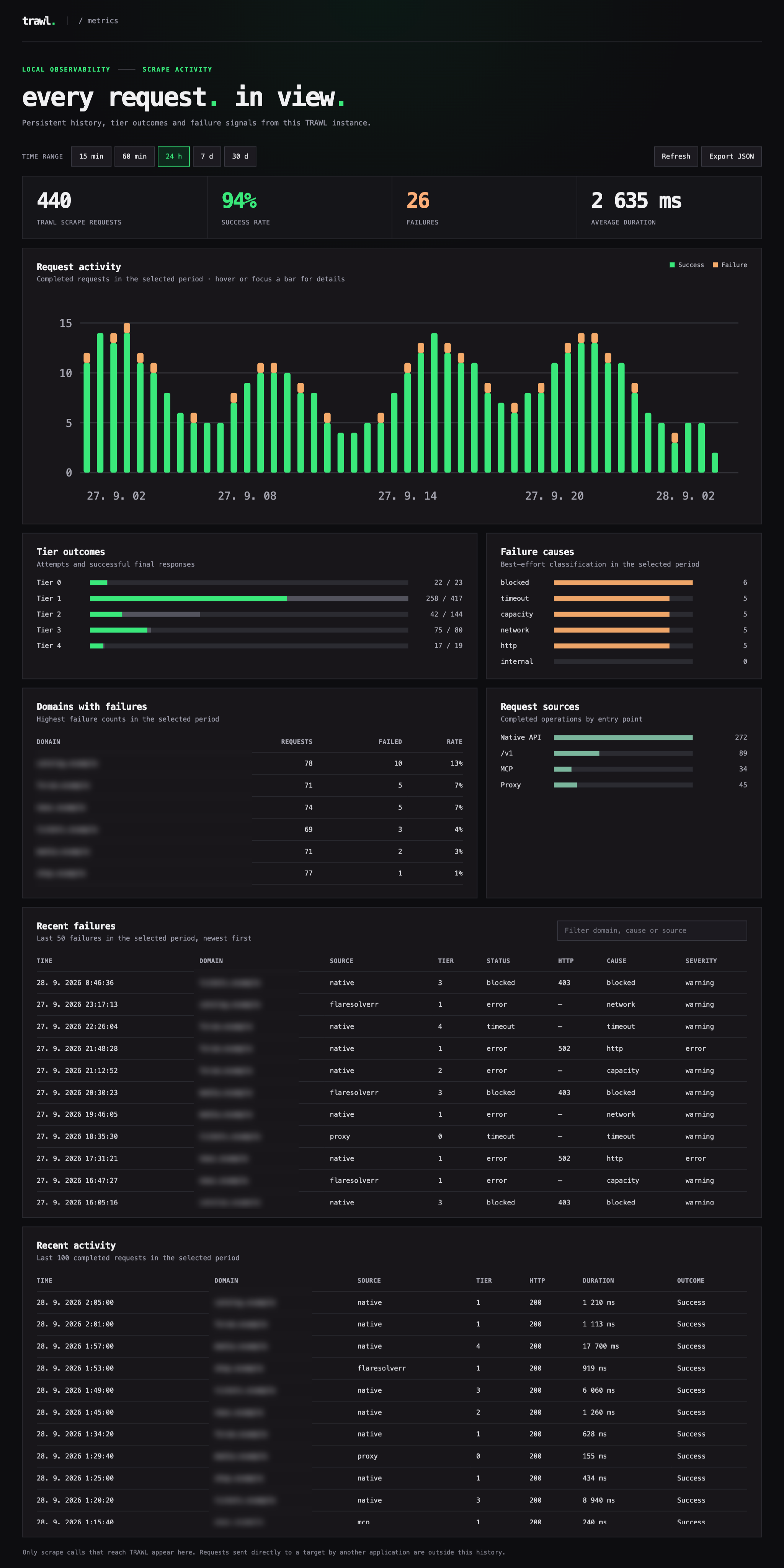
The image illustrates the dashboard layout with sample traffic. The running dashboard at /dashboard shows only requests recorded by that TRAWL instance.
The dashboard counts completed scraper operations from /scrape, /v1, MCP, and the MITM proxy. Direct proxy HTTP responses count as Tier 0; responses that escalate count once under the scraper result. Tier attempts exclude skipped tiers. HTTP responses with status 400 or higher count as failures. Direct streamed responses are counted when their headers arrive; later stream errors are not tracked. Invalid /scrape and /v1 requests and MCP scrape calls rejected before the scraper starts appear as failures. WebSocket relays, health checks, dashboard requests and MCP protocol discovery are not counted. When Prowlarr is the caller, only requests it forwards to the configured FlareSolverr proxy reach TRAWL; its direct indexer traffic is outside this view.
The dashboard shows request totals, success rate, average elapsed time, activity charts for 15 minutes, 1 hour, 24 hours, 7 days or 30 days, with hover and keyboard details for each time bucket, plus tier, source and failure-cause breakdowns. It also lists the latest 100 completed requests with timestamps, domains, duration, status and outcome, plus the latest 50 failures. The GET /dashboard/events stream signals new activity immediately; the page refreshes its snapshot when an event arrives and falls back to periodic refresh. The live view can be paused or refreshed manually. Export JSON downloads the selected snapshot. Categories are blocked, timeout, capacity, network, http and internal; they are best-effort classifications.
Metrics collection is disabled until a token or the explicit tokenless setting is set. By default, history is stored in SQLite at /data/metrics/trawl.sqlite; set METRICS_DB_PATH to change it. Docker Compose mounts a named volume at /data/metrics. History survives container restarts and is retained for 30 days, with a cap of 50,000 completed request records. All displayed counts are for the selected period. URL paths, queries, fragments, credentials, raw error messages, HTML, headers and cookies are never stored. No metrics are sent to a remote server. The history begins when persistent collection is first enabled; old Docker logs are not imported. The existing public /stats response contains only browser pool capacity and does not expose target hostnames.